The detailed results table shows prompt-by-prompt, model-by-model performance data. This is where you find specific insights to drive optimization. This guide explains how to read and use the results table effectively.
Accessing the Detailed Results Table
- Open your analysis results
- Scroll past the dashboard summary
- Find the Detailed Results section
- Table displays all prompts and their outcomes

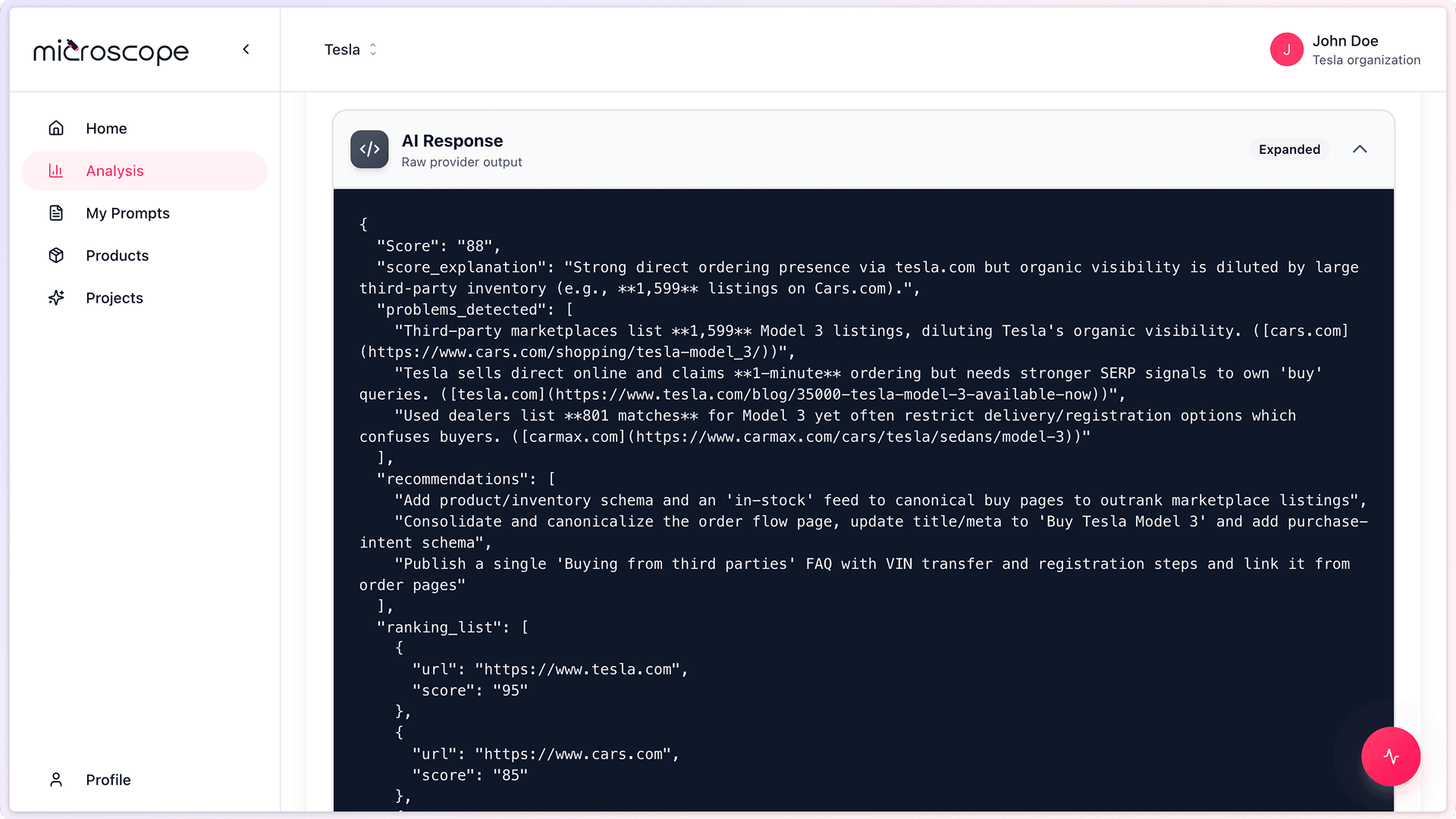
Table Structure
Typical Columns
The results table typically includes:
- Prompt - The question that was asked
- Category - Prompt category (Brand, Product, etc.)
- Model - Which AI model responded
- Mentioned - Yes/No if you were mentioned
- Position - Where you appeared in the response
- Accuracy - Whether information was correct
- Sentiment - Positive/Neutral/Negative
- Score - Prompt-specific score
- Actions - View response, analyze, flag
Row Organization
Rows are typically organized by:
- One row per prompt per model
- Grouped by prompt
- Expandable to show full AI responses
- Color-coded by performance
Understanding Each Column
Prompt Column
Shows the exact question asked to AI models:
- Full prompt text or truncated preview
- Click to see complete prompt
- May include variables replaced with your data
- Hover for prompt details
Reading Prompts
- Look for keywords relevant to your business
- Identify question type (comparison, recommendation, etc.)
- Note complexity and specificity
- Understand context provided
Category Column
Prompt category indicator:
- Brand, Product, Technical, or Trust
- Color or icon coded
- Filter by category
- Group analysis by category
Model Column
Which AI model provided this response:
- GPT, Gemini, Claude, Perplexity
- Model-specific logos or abbreviations
- Filter by model
- Compare across models
Mentioned Column
Yes/Mentioned
- Your brand or products were mentioned
- Usually indicated with green check or "Yes"
- Click to see where in response
- Good signal of visibility
No/Not Mentioned
- You were not mentioned in response
- Red X or "No"
- Opportunity for improvement
- Analyze why you were omitted
Position Column
Where you appeared in the AI response:
- Numeric rank: 1, 2, 3, etc.
- 1 = first mention (best)
- Higher numbers = later mention
- N/A if not mentioned
Interpreting Position
- Position 1 - Top recommendation or primary mention
- Position 2-3 - Among top options
- Position 4+ - Mentioned but not prioritized
- Varies by prompt type - Some prompts naturally list many options
Accuracy Column
Whether the AI information about you was correct:
Accurate
- Green indicator
- Information is correct and current
- Names, descriptions, features match reality
Inaccurate
- Red indicator
- Wrong information provided
- Outdated data
- Factual errors
Partially Accurate
- Yellow indicator
- Mix of correct and incorrect info
- Some details wrong
- Incomplete information
Not Applicable
- Gray indicator
- You weren't mentioned (can't assess accuracy)
- Or prompt doesn't require factual accuracy
Sentiment Column
Tone and favorability of mention:
- Positive - Favorable language and context
- Neutral - Objective, matter-of-fact mention
- Negative - Unfavorable language or criticism
- N/A - Not mentioned or not applicable
Score Column
Prompt-specific performance score:
- 0-100 scale or percentage
- Aggregates mention, position, accuracy, sentiment
- Color-coded: Green (high), Yellow (medium), Red (low)
- Contributes to overall and category scores
Interacting with the Table
Sorting
- Click column headers to sort
- Sort by score (lowest first to find issues)
- Sort by model to compare AI models
- Sort by category to group related prompts
Filtering
- Filter by category
- Filter by model
- Filter by mentioned (Yes/No)
- Filter by score range
- Filter by accuracy
Searching
- Search for specific prompts
- Find keywords
- Locate particular products or topics
- Quick navigation in large tables
Expanding Rows
Click a row to see more details:
- Full AI response
- Complete analysis
- Specific issues identified
- Recommendations for that prompt
Reading AI Responses
Viewing Responses
- Click View Response or expand row
- See full text AI provided
- Your mentions highlighted
- Competitor mentions highlighted (if applicable)
Analyzing Responses
Look for:
- Where you appear in the response
- How you're described
- What context surrounds your mention
- What competitors are mentioned
- Any inaccuracies or outdated info
- Tone and sentiment indicators
Response Quality Indicators
- Strong mention - Prominent, detailed, favorable
- Weak mention - Brief, generic, late in response
- Problematic mention - Inaccurate, outdated, negative
- Absent - Not mentioned despite relevance
Common Table Patterns
Consistently High Scores
- Multiple prompts with 80%+ scores
- Mentioned in first position frequently
- Accurate information
- Positive sentiment
Interpretation: Strong performance in this area. Maintain and leverage.
Mixed Results
- Scores varying widely (30-90%)
- Mentioned in some models, not others
- Accurate in some, inaccurate in others
Interpretation: Inconsistent presence. Optimize for consistency.
Consistently Low Scores
- Multiple prompts with sub-50% scores
- Rarely mentioned or not mentioned
- Low positions when mentioned
- Inaccuracies present
Interpretation: Weak performance requiring significant improvement.
Category-Specific Patterns
- Strong in Product, weak in Brand
- Strong in Trust, weak in Technical
- Identify category strengths and weaknesses
Interpretation: Focus optimization on weak categories.
Model-Specific Patterns
- Strong in GPT, weak in Gemini
- Consistent across most models
- One model significantly different
Interpretation: Model-specific optimization opportunities.
Using the Table for Analysis
Finding Quick Wins
- Sort by score, lowest first
- Find prompts with 40-60% scores
- Identify easy fixes (accuracy issues, outdated info)
- Prioritize high-visibility prompts
Identifying Patterns
- Filter by "Not Mentioned"
- See which prompts you're absent from
- Identify content gaps
- Understand where you're invisible
Competitive Analysis
- Look at comparison prompts
- See where competitors outrank you
- Identify differentiation opportunities
- Note competitive advantages mentioned
Accuracy Audit
- Filter by "Inaccurate"
- List all incorrect information
- Prioritize corrections
- Track sources of inaccuracies
Exporting and Sharing
Export Options
- Export full table to CSV/Excel
- Export filtered view only
- Include AI responses or just metrics
- Share with team for collaborative analysis
Use Cases for Exports
- Deep analysis in spreadsheets
- Custom reporting
- Share with content team
- Track specific prompts over time
- Create custom dashboards
Table Navigation Tips
For Large Tables (50+ prompts)
- Use filters aggressively
- Focus on one category at a time
- Sort strategically
- Use search for specific prompts
- Export subsets for detailed review
For Regular Review
- Start with "Not Mentioned" filter
- Review lowest scores
- Check new inaccuracies
- Compare to previous execution
For Executive Summary
- Filter top and bottom performers
- Export highlights
- Focus on overall patterns
- Note biggest changes
Action Items from Table Review
Content Creation
- Create content for topics where you're not mentioned
- Expand content where mentions are weak
- Create comparison content for competitive prompts
Content Updates
- Fix inaccuracies immediately
- Update outdated information
- Correct errors in descriptions
- Refresh old content
SEO and Discoverability
- Optimize for prompts where you're absent
- Target keywords from strong prompts
- Build authority in weak areas
Competitive Positioning
- Strengthen differentiation where competitors outrank you
- Highlight unique value props
- Create head-to-head comparisons
Best Practices
- Review systematically - Don't just glance, analyze thoroughly
- Document findings - Keep notes on patterns and issues
- Track over time - Compare tables from multiple executions
- Share with team - Ensure everyone understands results
- Prioritize actions - Not all issues are equally important
- Validate insights - Read actual AI responses, not just metrics
- Look for root causes - Don't just treat symptoms
Common Mistakes to Avoid
- Focusing only on overall scores, ignoring details
- Not reading actual AI responses
- Treating all prompts as equally important
- Ignoring positive results (learn from success too)
- Analysis paralysis - reviewing without taking action
- Not comparing to previous executions
Next Steps
With table mastery, you're ready to:
- Drill into individual prompt results
- Compare results across executions
- Build action plans based on findings
- Track improvements over time