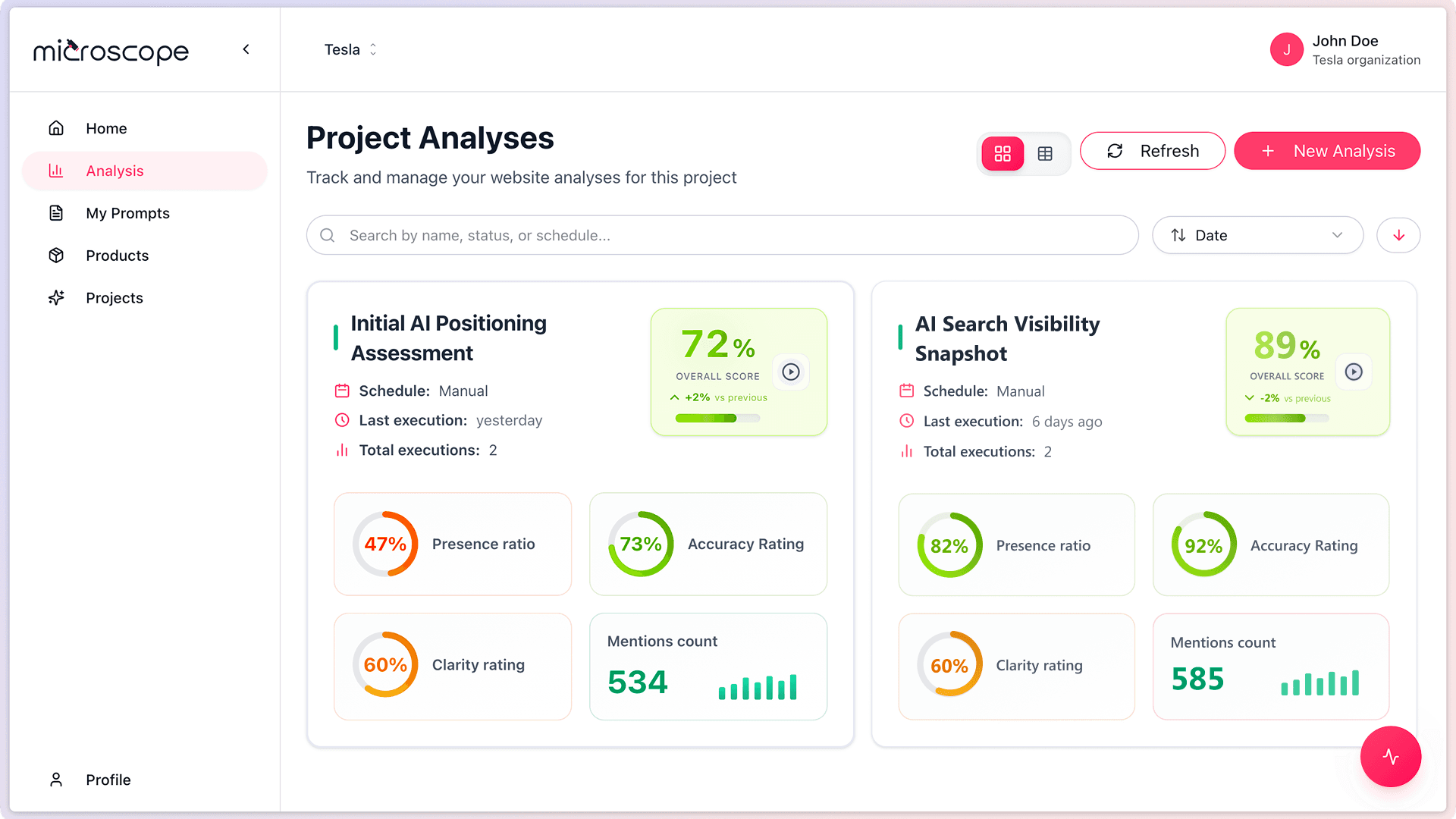
An analysis in Microscope.ai is a collection of prompts executed against AI models to monitor your brand's presence and performance. Understanding analyses is essential for effective AI search optimization.
Definition of an Analysis
An analysis is a configured set of:
- Selected prompts (questions)
- Target AI models (GPT, Gemini, Claude, Perplexity)
- Execution settings
- Scheduling options
When you run an analysis, Microscope.ai sends all selected prompts to the chosen AI models and collects their responses for evaluation.
The Role of Analyses
Monitoring Framework
Analyses provide the structure for:
- Regular monitoring of AI performance
- Tracking changes over time
- Comparing different prompt categories
- Measuring optimization effectiveness
Data Collection
Each analysis generates:
- AI model responses for each prompt
- Scoring and evaluation metrics
- Historical data for trend analysis
- Actionable insights and recommendations
Analysis Hierarchy
Understanding where analyses fit in the platform:
- Organization - Top-level entity
- Projects - Separate monitoring initiatives
- Analyses - Collections of prompts
- Executions - Individual runs of an analysis
- Prompt Results - AI responses for each prompt
An analysis can be executed multiple times, creating multiple executions with time-stamped results.
Types of Analyses
One-Time Analysis
Execute once for immediate insights:
- Quick checks or audits
- Campaign validation
- Pre-launch testing
- Ad-hoc investigations
Recurring Analysis
Schedule for ongoing monitoring:
- Daily, weekly, or monthly execution
- Consistent trend tracking
- Automated monitoring
- Long-term performance measurement
What Makes Up an Analysis?
Name and Description
- Descriptive name for identification
- Optional description of purpose
- Helps organize multiple analyses
Selected Prompts
- Choose from automatic and custom prompts
- Can include all or subset of prompts
- Organize by category or objective
- Typical range: 10-50 prompts per analysis
Target AI Models
Select which AI models to query:
- GPT models (OpenAI)
- Gemini models (Google)
- Claude models (Anthropic)
- Perplexity AI
More models = more comprehensive insights but higher usage cost.
Execution Settings
- Run immediately or schedule
- One-time or recurring
- Frequency (if recurring)
- Notification preferences
How Analyses Work
The Execution Process
When an analysis runs:
- Microscope.ai sends each prompt to each selected AI model
- AI models generate responses
- Responses are analyzed for mentions, accuracy, positioning
- Scores are calculated
- Results are stored and available for review
- Insights and recommendations are generated
Execution Time
Factors affecting execution time:
- Number of prompts
- Number of AI models
- AI model response times
- Platform load
Typical execution: 5-15 minutes for 20 prompts across 4 models.
Analysis Results
What You Get
After an analysis executes, you receive:
- Overall performance scores
- Category-level insights
- Prompt-by-prompt results
- AI model comparisons
- Mention frequency and accuracy
- Competitive positioning data
- Trends (if historical data exists)
- Actionable recommendations
Result Views
- Dashboard view - High-level metrics
- Detailed results table - All prompts and responses
- Prompt drill-down - Individual prompt analysis
- Trends - Performance over time
- Comparisons - Model-by-model or execution-by-execution
Analyses vs. Executions
Analysis
- The configuration and setup
- Defines what to monitor
- Can be reused multiple times
- Does not change unless edited
Execution
- A single run of an analysis
- Captures results at a point in time
- Each execution has a unique ID and timestamp
- Historical record
Think of an analysis as a template and executions as instances of that template.
Common Analysis Strategies
Comprehensive Baseline Analysis
- Include all automatic prompts
- Cover all categories
- Query all available AI models
- Run monthly for trend tracking
Category-Focused Analysis
- Select prompts from one category
- Deep dive into specific area
- Run after optimizing that category
- Measure impact of targeted efforts
Campaign-Specific Analysis
- Custom prompts related to campaign
- Run before, during, and after campaign
- Measure campaign effectiveness
- Track message penetration into AI
Competitive Analysis
- Prompts comparing you to competitors
- Track competitive positioning
- Identify differentiation opportunities
- Monitor competitive dynamics
Best Practices
- Name clearly - Use descriptive names
- Start comprehensive - Begin with broad coverage
- Refine over time - Focus analyses as you learn
- Schedule strategically - Balance frequency with quota
- Review results regularly - Don't just run analyses, analyze them
- Document objectives - Use descriptions to note purpose
- Compare executions - Look for trends and changes
Next Steps
Now that you understand analyses, you're ready to:
- Learn how to create your first analysis
- Explore execution and scheduling options
- Understand how to interpret analysis results
- Build an ongoing monitoring strategy